
Introduction
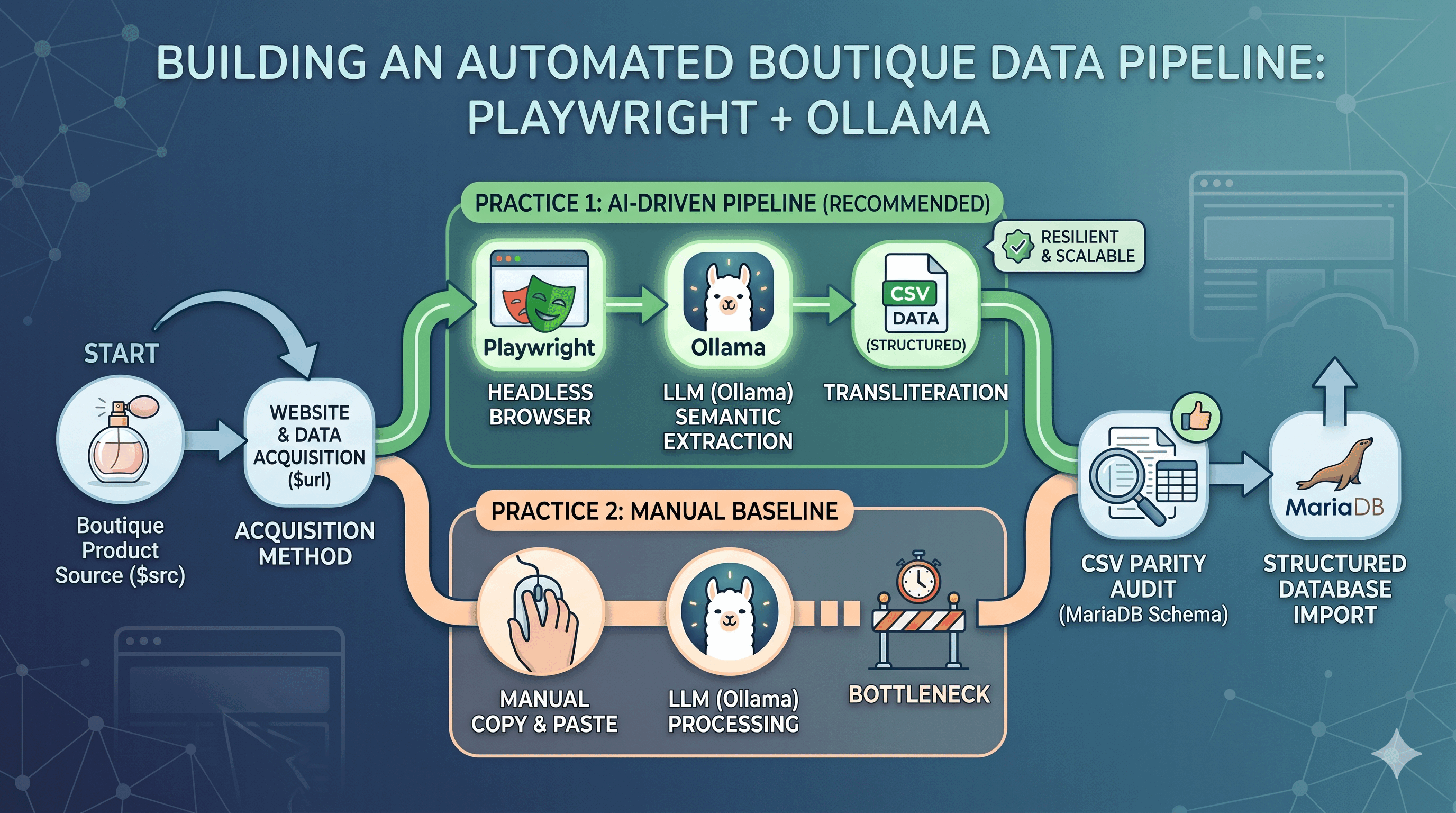
Modern web scraping is moving away from fragile CSS selectors and toward Semantic Extraction. This post explores how to build a resilient data pipeline using Playwright for browser automation and Ollama for local LLM-driven data transliteration.
The Workflow Model
- $src: SOURCE_PRODUCT (e.g., Boutique elegant ladies' perfume)
- $url: Target website (preferably with an API endpoint or well-structured DOM)
Phase 1: The Audit
Before scraping, we audit the target $url for best practices.
- API Check: Does the site expose a JSON endpoint? If so, we bypass HTML parsing.
- DOM Density: How much "noise" (ads, scripts) exists vs. actual product data?
- Anti-Bot Check: Does the site require browser-level signals (User-Agents, cookies) provided by Playwright?
Phase 2: The Two Practices
Practice 1: The Automated Pipeline (Playwright + Ollama)
This is the gold standard for scalability.
- Headless Navigation: Playwright launches a headless Chromium instance to render JavaScript-heavy content.
- Context Extraction: We grab the innerText or a cleaned HTML subset to reduce token waste.
- Local Transliteration: The raw text is piped to Ollama (e.g., Llama 3) with a system prompt:
"Convert this raw text into a CSV. Match these specific headers: [Product, Brand, Price, SKU]. Ensure parity with MariaDB schema."
- Result: A structured CSV generated without writing a single regex line.
Practice 2: The Manual Baseline (Copy-Paste + Ollama)
Useful for one-off tasks or auditing the automated pipeline.
- Manual Capture:
CTRL+Aon the live site and copy to clipboard. - Direct Feed: Paste the unstructured text into a local LLM prompt.
- Comparison: This serves as the "Control Group" to verify that Playwright is capturing the same (or more) data than a human viewer.
Phase 3: Audit, Parity, and Import
The final step is the "Gatekeeper" phase.
- Schema Validation: Check the CSV against the MariaDB
Source-of-Truth. Are types (Decimal, Varchar) aligned? - Parity Audit: Compare the Playwright output vs. the Manual output to ensure no data loss occurred during headless rendering.
- Ingestion: Import the validated CSV into the database.
Conclusion
By combining Playwright’s ability to see the web like a human with Ollama’s ability to reason like a data analyst, we create a scraping pipeline that doesn't break when a class name changes. It’s not just scraping; it’s automated data entry at scale.