
Qwen models and Alibaba Cloud infrastructure are permanently banned and retired from the tVOX.online platform (INV-105 / DELTA-247) following unauthorized auto-debits, non-transparent billing practices, and endpoint gateway timeouts.
Using Ollama for AI on Localhost
Models Available for Ollama
If the LLM model selected is an llm-model-name:cloud (cloud-based model), you will not experience delay. Cloud models have usage limits for Subscribed, FREE plan users: a paid subscription is recommended, but not required.
Understand the Core Dynamic in Cloud Usage
Each message includes the full conversation history. So as we go:
  Turn 1:  [you msg]         → tokens for just turn 1
  Turn 2:  [turn 1 + you msg] → larger than turn 1
  Turn 3:  [turn 1 + 2 + you]   → even bigger
Every new message re-sends everything you've said so far as context for the model to reason over. That's why a 20-message conversation costs way more than 20 separate 1-message conversations.
On the Ollama side, what you're seeing is probably a running meter that tallies up all the input+output tokens from your API calls. It counts both directions — what you send and what comes back.
Why it accelerates: Longer conversations → more context → more tokens per message → meter climbs faster as you go.
Caching: Ollama may cache shared context to reduce repeat transmission, but it's model/usage pattern dependent — not guaranteed.
Output length matters too — a short question from you + a long detailed answer from me = significant output tokens on my side of the meter.
no kidding! it sends the complete history every time!? Does that mean it's bettter to continue to open a new session per question or request? ~ @ajaxStardust
It's situational — depends on what you're doing:
Start a new session when:
- You're done with a topic and moving to something unrelated
- The prior context has no value for the new task
- You'd spend more tokens re-explaining everything than you'd save
Keep the session when:
- You're building on something (debugging code, iterative work)
- The prior context is genuinely useful to carry forward
- Re-establishing background would cost as much or more than continuing
The math: Say you have a 50-message conversation. Starting fresh saves ~49 messages of context... but if you need to re-explain 20 messages worth of background to get back up to speed, you've spent half your savings just getting there.
Best practice: It's not about fresh vs. continuing — it's about when to reset. For Ollama specifically, if you're done with a task, close it out and start fresh for the next one. But don't churn sessions mid-task just to save tokens.
Think of it like a document: you don't close a document every few paragraphs to "save memory." You close it when you're done with the chapter.
 connected | idle
 agent main | session main (openclaw-tui) | ollama/minimax-m2.7:cloud | tokens 13k/197k (6%)
Prerequisites
Install Nodejs and npm (via your package manager)
Install NVM for OpenCLAW:
You'll need nvm to change Node.js version to 22 or newer.
curl -o- https://raw.githubusercontent.com/nvm-sh/nvm/v0.40.4/install.sh | bash
# or
wget -qO- https://raw.githubusercontent.com/nvm-sh/nvm/v0.40.4/install.sh | bash
nvm install 24
nvm use 24
Ollama Primary Installer
Ollama
curl -fsSL https://ollama.com/install.sh | sh
After installation: ollama launch
Supplemental to Ollama
The advantage to these tools is that they work with your Ollama installation, and by installing them standalone, you might take leverage that compatibility to facilitate further learning.
Install Claude CLI (Skils Tooling)
curl -fsSL https://claude.ai/install.sh | bash
Install OpenCode (Skils Tooling)
curl -fsSL https://opencode.ai/install | bash
Install Cline CLI (Skils Tooling)
npm install -g cline
Install OpenAI Codex [ChatGPT] (Skils Tooling)
curl -fsSL https://chatgpt.com/codex/install.sh | sh
More CLI Agents
See the list here for more CLI Agent options. Not all listed there are necessarily meant to be used with Ollama.
LLM Models Available for Ollama
Start an LLM on Localhost with Ollama
ollama launch openclaw --model minimax-m2.7:cloud
ollama run qwen:latest(1)
ollama launch claude --model gemma4:latest
ollama launch opencode --model gpt-oss
Terminology: LLM Tool
Skills Tooling with Ollama
Use Ollama CLI with Tooling on Localhost. Apps like openclaw allow you to do a lot more, such as edit files on your filesystem, organize folders, and all sorts of fantastic things.
Senior engineers commonly use more specific terms rather than the generic "LLM tool." From industry docs and project sites (OpenClaw, OpenCode, blogs), the top preferred labels are:
- Agent framework or "agentic framework" — for systems that orchestrate multi-step/autonomous workflows, maintain memory, schedule tasks, and manage skills/plugins. (OpenClaw uses this language and "skills".)
- Coding assistant or "AI coding assistant" — for tools that augment developer workflows interactively (refactoring, multi-file edits, LSP integration).
- Code-execution runtime or LLM code-execution framework — for projects exposing safe runtimes to run model-generated code.
- "Integration/adapter library" or tooling for LLMs — when the project mainly provides connectors to external services (APIs, DBs, CLIs).
- "Developer platform" or toolchain — when the product bundles orchestration, observability, and developer UX.

Practical guidance:
- Call OpenClaw an "agent framework" (itself uses terms like "agents", "skills", "orchestration").
- Call OpenCode a "coding assistant" or "LLM code-execution framework" if its core is multi-file edits, LSP integration, and running code from models; call it an "LLM developer toolchain" if it bundles validation and observability.
(1) Not all Models support tooling. Those that don't support tooling can be launched with run, without a UI like OpenClaw
Recommended Local Models
Starting an LLM takes time. The smaller the model, the faster the startup.

Try them by size, starting with smallest first. The stars are a rough guess as remembered.
Tooling-Supported Models Used Successfully
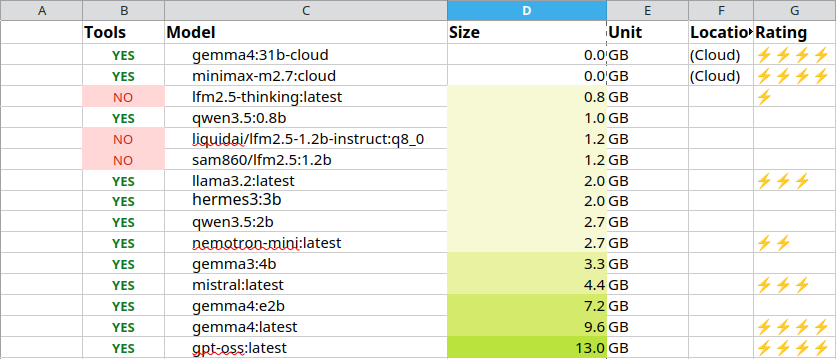
Why Tooling?
As mentioned elsewhere in this article, tooling or the toolchain or whatever someone decides is the right terminology for the context, tooling is the requirement that enables the model to edit files in an editor like Kiro, VS Code, Zed, and Cursor, etc.
Cloud Models:
Nemotron (NVIDIA)
ollama launch claude --model nemotron-3-super:cloudNVIDIA Nemotron 3 Ultra is a 550 billion parameter (55B active) open model from NVIDIA built for long-running, agentic workflows with fast and affordable performance across hundreds of tool calls.
Model highlights
- Built for long-running agents: Tuned for agent orchestration, coding agents, deep research, and complex enterprise workflows that run across hundreds of steps.
- 1M token context: Keep entire codebases, long tool histories, and research trails in context without losing the thread.
- Frontier reasoning, high efficiency: 550B total parameters with only 55B active per token, and optimized for NVFP4, NVIDIA’s 4-bit floating point format that packs the model into less memory and runs faster.
Benchmarks
Nemotron 3 Ultra leads on accuracy across agent productivity, instruction following, and long-context tasks, while delivering leading throughput—saving up to 30% on costs compared to other leading open models.
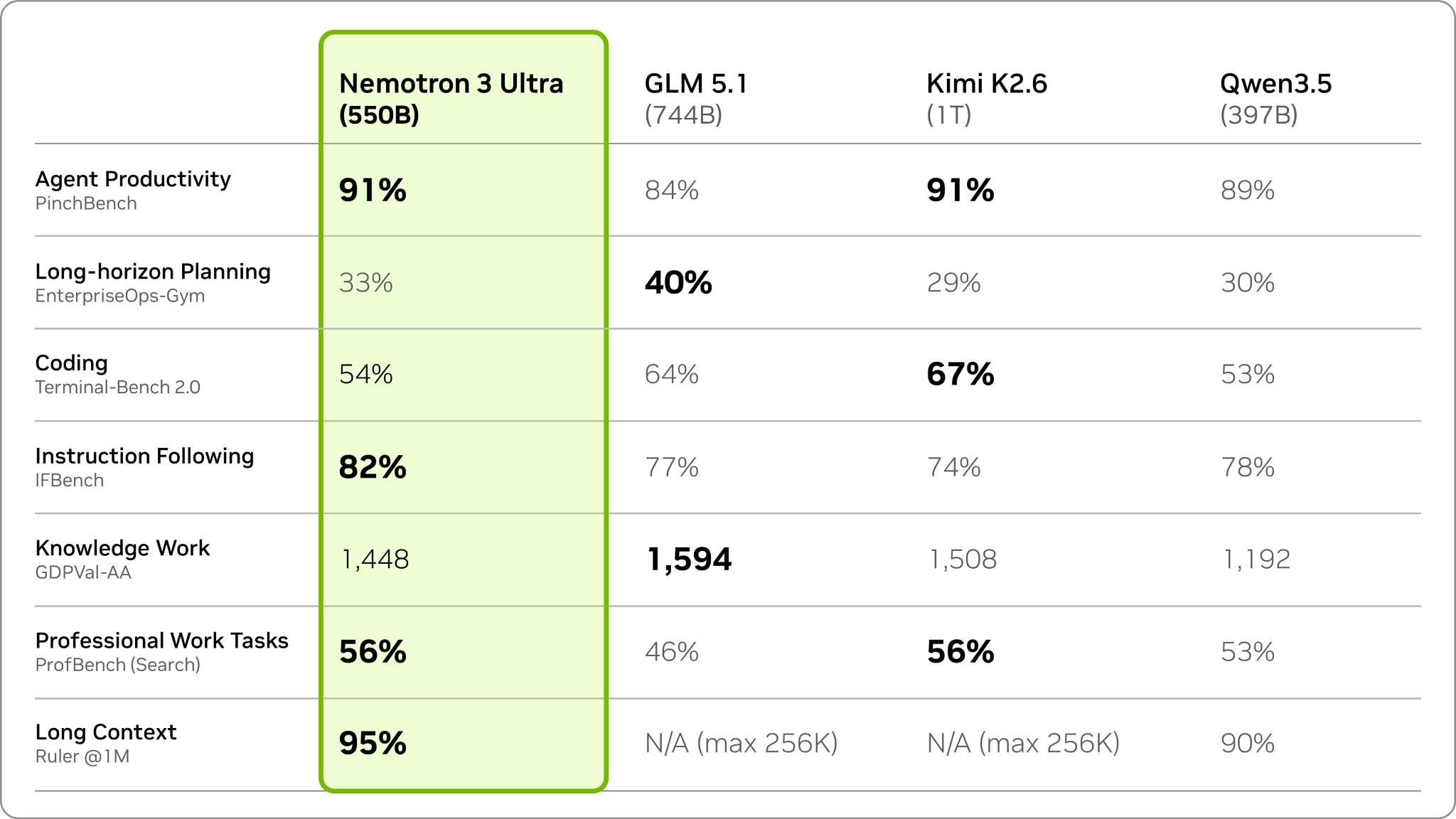 Figure 1: Nemotron 3 Ultra leads among open models on agentic benchmarks for agent productivity, coding, and instruction following.
Reference
Qwen
Following the February release of the Qwen3.5 series, we’re pleased to share the first open-weight variant of Qwen3.6. Built on direct feedback from the community, Qwen3.6 prioritizes stability and real-world utility, offering developers a more intuitive, responsive, and genuinely productive coding experience.
Qwen3.6 Highlights
This release delivers substantial upgrades, particularly in
-
Agentic Coding: the model now handles frontend workflows and repository-level reasoning with greater fluency and precision.
-
Thinking Preservation: we’ve introduced a new option to retain reasoning context from historical messages, streamlining iterative development and reducing overhead.
qwen3.5:cloud - (untested) . jcyhsiao/qwen3.5cloud:latest - 0.0 GB (Cloud + Vision) - ⚡ [ agent claimed vision not supported ] Qwen by Alibaba. Qwen Studio offers comprehensive functionality spanning chatbot, image and video understanding, image generation, document processing, web search integration, tool utilization, and artifacts.
minimax
Ollama’s Cloud is officially licensed with MiniMax for commercial usage
In partnership with MiniMax, the M3 model on Ollama’s Cloud is US-based with zero data retention.
Highlights
-
MiniMax M3 achieves top-tier performance on coding and agentic benchmarks, with autonomous task decomposition, tool invocation, and multi-step reasoning capabilities — providing a reliable foundation for AI coding assistants and automated workflows.
-
Powered by the proprietary MiniMax Sparse Attention (MSA) architecture, M3 supports up to 1M tokens context window with a guaranteed minimum of 512K tokens. The 1M context is the infrastructure for long-range Agent tasks, long-range Coding, and long-video understanding.
-
A natively multimodal model. The entire data pipeline was rebuilt to scale pretraining data to 100T+, with multimodal training from step zero achieving deep alignment between textual and visual semantic spaces. Multimodal is a native core capability, not a superficial add-on.
-
On BrowseComp, M3 scores 83.5, surpassing Opus 4.7 (79.3), demonstrating strong autonomous browsing and information retrieval capabilities.
-
Until now, only a handful of closed-source models could simultaneously achieve frontier coding capabilities, million-token context, and Multimodal. M3 is the first to bring complete frontier capability to the open world.
Benchmark
Architecture
MiniMax Sparse Attention (MSA) Architecture
The MSA architecture enables native ultra-long context pretraining. M3 supports up to 1M tokens context window with a guaranteed minimum of 512K tokens, delivering excellent inference latency and throughput at extreme context lengths. The 1M context is the infrastructure for long-range Agent tasks, long-range Coding, and long-video understanding.
- minimax-m2.7:cloud - 0.0 GB (Cloud) - ⚡⚡⚡⚡
- ollama launch hermes --model minimax-m3:cloud
Gemma
Gemma is a family of open models built by Google DeepMind. Gemma 4 models are multimodal, handling text and image input and generating text output.
Gemma 4 introduces key capability and architectural advancements :
-
Reasoning – All models in the family are designed as highly capable reasoners, with configurable thinking modes.
-
Extended Multimodalities – Processes Text, Image with variable aspect ratio and resolution support (all models)
-
Diverse & Efficient Architectures – Offers Dense and Mixture-of-Experts (MoE) variants of different sizes for scalable deployment.
-
Optimized for On-Device – Smaller models are specifically designed for efficient local execution on laptops and mobile devices.
-
Increased Context Window – The small models feature a 128K context window, while the medium models support 256K.
-
Enhanced Coding & Agentic Capabilities – Achieves notable improvements in coding benchmarks alongside native function-calling support, powering highly capable autonomous agents.
-
Native System Prompt Support – Gemma 4 introduces native support for the
systemrole, enabling more structured and controllable conversations.
Models
Ollama’s cloud
ollama run gemma4:31b-cloud
Edge models
The “E” in E2B and E4B stands for “effective” parameters, and are made for edge device deployments.
Effective 2B (E2B)
ollama run gemma4:e2b
Effective 4B (E4B)
ollama run gemma4:e4b
Workstation models
These models are designed for frontier intelligence locally.
12B
ollama run gemma4:12b
26B (Mixture of Experts model with 4B active parameters)
ollama run gemma4:26b
31B (Dense)
ollama run gemma4:31b
Benchmark Results
These models were evaluated against a large collection of different datasets and metrics to cover different aspects of text generation. Evaluation results marked in the table are for instruction-tuned models.
|
|
Gemma 4 31B | Gemma 4 26B A4B | Gemma 4 E4B | Gemma 4 E2B | Gemma 3 27B (no think) |
|---|---|---|---|---|---|
| MMLU Pro | 85.2% | 82.6% | 69.4% | 60.0% | 67.6% |
| AIME 2026 no tools | 89.2% | 88.3% | 42.5% | 37.5% | 20.8% |
| LiveCodeBench v6 | 80.0% | 77.1% | 52.0% | 44.0% | 29.1% |
| Codeforces ELO | 2150 | 1718 | 940 | 633 | 110 |
| GPQA Diamond | 84.3% | 82.3% | 58.6% | 43.4% | 42.4% |
| Tau2 (average over 3) | 76.9% | 68.2% | 42.2% | 24.5% | 16.2% |
| HLE no tools | 19.5% | 8.7% | - | - | - |
| HLE with search | 26.5% | 17.2% | - | - | - |
| BigBench Extra Hard | 74.4% | 64.8% | 33.1% | 21.9% | 19.3% |
| MMMLU | 88.4% | 86.3% | 76.6% | 67.4% | 70.7% |
| Vision |
|
|
|
|
|
| MMMU Pro | 76.9% | 73.8% | 52.6% | 44.2% | 49.7% |
| OmniDocBench 1.5 (average edit distance, lower is better) | 0.131 | 0.149 | 0.181 | 0.290 | 0.365 |
| MATH-Vision | 85.6% | 82.4% | 59.5% | 52.4% | 46.0% |
| MedXPertQA MM | 61.3% | 58.1% | 28.7% | 23.5% | - |
| Audio |
|
|
|
|
|
| CoVoST | - | - | 35.54 | 33.47 | - |
| FLEURS (lower is better) | - | - | 0.08 | 0.09 | - |
| Long Context |
|
|
|
|
|
| MRCR v2 8 needle 128k (average) | 66.4% | 44.1% | 25.4% | 19.1% | 13.5% |
Model information
| Property | E2B | E4B | 31B Dense |
|---|---|---|---|
| Total Parameters | 2.3B effective (5.1B with embeddings) | 4.5B effective (8B with embeddings) | 30.7B |
| Layers | 35 | 42 | 60 |
| Sliding Window | 512 tokens | 512 tokens | 1024 tokens |
| Context Length | 128K tokens | 128K tokens | 256K tokens |
| Vocabulary Size | 262K | 262K | 262K |
| Supported Modalities | Text, Image, Audio | Text, Image, Audio | Text, Image |
| Vision Encoder Parameters | ~150M | ~150M | ~550M |
| Audio Encoder Parameters | ~300M | ~300M | No Audio |
Mixture-of-Experts (MoE) Model
| Property | 26B A4B MoE |
|---|---|
| Total Parameters | 25.2B |
| Active Parameters | 3.8B |
| Layers | 30 |
| Sliding Window | 1024 tokens |
| Context Length | 256K tokens |
| Vocabulary Size | 262K |
| Expert Count | 8 active / 128 total and 1 shared |
| Supported Modalities | Text, Image |
| Vision Encoder Parameters | ~550M |
Best Practices
For the best performance, use these configurations and best practices:
1. Sampling Parameters
Use the following standardized sampling configuration across all use cases:
temperature=1.0top_p=0.95top_k=64
2. Thinking Mode Configuration
Note that Ollama already handles the complexities of the chat template for you.
Compared to Gemma 3, the models use standard system , assistant , and user roles. To properly manage the thinking process, use the following control tokens:
- Trigger Thinking: Thinking is enabled by including the
<|think|>token at the start of the system prompt. To disable thinking, remove the token. - Standard Generation: When thinking is enabled, the model will output its internal reasoning followed by the final answer using this structure:
<|channel>thought\n[Internal reasoning]<channel|> - Disabled Thinking Behavior: For all models except for the E2B and E4B variants, if thinking is disabled, the model will still generate the tags but with an empty thought block:
<|channel>thought\n<channel|>[Final answer]
3. Multi-Turn Conversations
- No Thinking Content in History : In multi-turn conversations, the historical model output should only include the final response. Thoughts from previous model turns must not be added before the next user turn begins.
4. Modality order
- For optimal performance with multimodal inputs, place image and/or audio content before the text in your prompt.
5. Variable Image Resolution
Aside from variable aspect ratios, Gemma 4 supports variable image resolution through a configurable visual token budget, which controls how many tokens are used to represent an image. A higher token budget preserves more visual detail
at the cost of additional compute, while a lower budget enables faster inference for tasks that don’t require fine-grained understanding.
- The supported token budgets are: 70 , 140 , 280 , 560 , and 1120 .
- Use lower budgets for classification, captioning, or video understanding, where faster inference and processing many frames outweigh fine-grained detail.
- Use higher budgets for tasks like OCR, document parsing, or reading small text.
blissful_ishizaka_626/gemma4-cloud - 0.0 GB (Cloud + Vision) - gemma4:31b-cloud - 0.0 GB (Cloud) - Kimi

Kimi K2.7 Code is a coding-focused agentic model built upon Kimi K2.6. With substantial improvements on real-world long-horizon coding tasks, it strengthens end-to-end task completion across complex software engineering workflows while improving token efficiency, reducing thinking-token usage by approximately 30% compared with Kimi K2.6.
Key Features
- Long-horizon coding : Substantial gains on realistic, end-to-end software engineering tasks across 10+ programming languages and a full production tech stack, spanning backend services, infrastructure, performance engineering, systems programming, security, frontend, and ML/data engineering.
- Improved token efficiency : Reduces thinking-token usage by approximately 30% compared with Kimi K2.6, while improving task completion on complex workflows.
- Stronger agentic tool use : Improved performance on multi-step tool calling and MCP-based environments, with interleaved thinking preserved across turns (
preserve_thinking) for coherent multi-step coding sessions. - Native multimodal : Supports image and video input via the MoonViT vision encoder, with a 256K token context window.
- kimi-k2.7-code:cloud
- kimi-k2.6:cloud - 0.0 GB (Cloud + Vision) - ⚡⚡⚡⚡ [ does well with finga.studio ]
Details Placeholder
Local Models Ordered by Size (ideally):
- lfm2.5-thinking - 0.8 GB - ⚡
- qwen3.5:0.8b - 1.0 GB - (not tested)
- llama3.2:latest - 2.0 GB - ⚡⚡⚡
- nemotron-mini:latest - 2.7 GB - ⚡⚡
- mistral:latest - 4.4 GB - ⚡⚡⚡
- gemma4:e2b - 7.2 GB - (not tested)
- gemma4:latest - 9.6 GB - ⚡⚡⚡⚡
- gpt-oss:latest - 13 GB - ⚡⚡⚡⚡
Tooling-Unsupported Models Used Successfully
These models are fine selections to use in a capable IDE, but without tools, you'll be responsible for the physical editing. As mentioned under tooling-supported-models, tooling is the requirement that enables the model to edit files in an editor like Kiro, VS Code, Zed, and Cursor, etc.
The LLM models which don't support tools are far from useless! E.g. you may be surprised at how responsive the LLM is, running it with a command like ollama run qwen:latest, where no tooling is in the chain. The security profile is different from using ChatGPT, or Gemini online because you're not sending any private information across the network. Compare the concept to using web based LLM like ChatGPT, MS Copilot, etc..
- liquidai/lfm2.5-1.2b-instruct:q8_0 - 1.2 GB - ⚡⚡⚡⚡
- qwen:latest - 2.3 GB - ⚡⚡⚡ (a fine compromise if dont need tooling)
- gemma3:4b - 3.3 GB - ⚡⚡⚡
Fedora 44:
TL;DR (For People Who Just Landed Here)
This page is not a step-by-step tutorial. It’s a map of the real dynamics behind running LLMs locally with Ollama — the stuff you only learn after you’ve broken things, waited too long for a model to load, or wondered why your token meter suddenly exploded.
- Local models load slowly because they must fit entirely in RAM.
- Cloud models load instantly but have usage limits.
- Tooling support determines whether an LLM can edit files in your IDE.
- Smaller models start fast; larger models reason better.
- Sessions grow in cost because every message includes the full history.
Everything else on this page expands those points in the places where the official docs don’t.
Answers to Questions No One Has Asked (Yet)
Most people ask the obvious questions: “How do I install Ollama?” “What model should I use?” “Why is it slow?”
This page is about the other questions — the ones you don’t know to ask until you’ve already spent hours experimenting:
- Why does the token meter accelerate?
- When should you reset a session?
- Which models actually support tooling?
- Why does OpenClaw need Node 22+?
- Why does a 2 GB model feel faster than a 7 GB one?
- Why does “local” sometimes feel slower than “cloud”?
These aren’t beginner questions — they’re the questions that only appear once you’ve gone deep enough to notice the edges.
Model Selection Cheat Sheet
A quick, opinionated guide for choosing a model without overthinking it:
- Need tools? Use: gemma4:latest, gpt-oss, minimax-m2.7:cloud
- Need speed? Use: qwen3.5:0.8b, llama3.2, lfm2.5-thinking
- Need reasoning? Use: gemma4:latest, gpt-oss
- Low RAM? Use: qwen3.5:0.8b or llama3.2
- Want zero load time? Use any
:cloudmodel
Rule of thumb: start small, move up only when you hit a wall.
Troubleshooting Quicklist
- Model won’t load: You don’t have enough RAM for that size.
- OpenClaw errors: Node must be 22+ (use
nvm). - Tools not working: The model probably doesn’t support tooling.
- Slow startup: First load is always slow; second load is cached.
- Token meter exploding: Long sessions resend full history every turn.
- Cloud feels slow: Output length matters more than load time.
Glossary (Ollama-Specific)
- Modelfile: A recipe describing how to build a custom model.
- Template: The system prompt + formatting rules for a model.
- Context window: How much conversation the model can remember.
- Embedding: A vector representation used for search or memory.
- Tag: The suffix after
:(e.g.,:latest,:q4_0). - Tooling: The model’s ability to edit files or run actions in an IDE.

Related Work: CONTRACT‑Style‑Comments (CSC)
The ideas explored in this article connect directly to my formalized framework CONTRACT‑Style‑Comments, now published as an open GitHub repository:
Access it the Contract-Style Comments repo on GitHub:
CSC provides a structured, three‑artifact governance model designed for both human developers and stateless AI agents. It addresses the same core problem discussed here: how to prevent architectural drift and comprehension debt in systems touched by AI.
Why CSC Matters in This Context
- It externalizes invariants into
CONTRACT.md - It externalizes reasoning into
WHY.md - It externalizes operational truth into
QUICKSTART.md - It gives AI agents a safe, bounded interface
- It reduces the cognitive load that fuels comprehension debt
If this article resonated with you, CSC offers a practical implementation of the principles described here — a way to turn theory into operational clarity.